

hashlib module in python. A cryptographic hash function is a specialized function that takes input data and generates a fixed-length, statistically unique output, known as a hash. This hash is distinct for each unique input, ensuring the integrity of the data. In this detailed guide, you will learn how to use the hashlib module to compute the hash of a file in Python.
The hashlib module is part of Python’s standard library, meaning it comes pre-installed with Python, so you can use it directly by importing it:
import hashlib
What is the Hashlib Module?
The hashlib module provides a common interface for many secure cryptographic hash and message digest algorithms. Each type of hash has its own constructor method, which returns a hash object with a consistent interface. The module ensures that constructors for various hash algorithms are always available.
Guaranteed Algorithms
The hashlib.algorithms_guaranteed attribute is a set containing the names of hash algorithms that are guaranteed to be supported by the hashlib module on all platforms.
import hashlib
print(hashlib.algorithms_guaranteed)
Output:

Available Algorithms
The hashlib.algorithms_available attribute is a set containing the names of hash algorithms available in the currently running Python interpreter. Some algorithms may appear multiple times under different names due to variations in OpenSSL support.
import hashlib
print(hashlib.algorithms_available)
Output:
{'sha384', 'sha3_224', 'whirlpool', 'ripemd160', 'blake2s', 'md5-sha1', 'sm3', 'sha256', 'shake_256', 'sha1', 'sha3_384', 'sha512', 'blake2b', 'sha512_256', 'sha3_256', 'shake_128', 'sha3_512', 'sha224', 'md5', 'mdc2', 'sha512_224', 'md4'}
Explanation of the SHA-256 Algorithm and Its Features
This guide will demonstrate how to use the FIPS secure hash algorithm SHA-256 to compute the hash of a file. Other secure hash algorithms include:
- MD5 (Message Digest 5)
- SHA-512 (Secure Hashing Algorithm 512 bits)
- RC4 (Rivest Cipher 4)
SHA-256 is chosen for this example because it is one of the most widely recognized and secure hashing algorithms currently in use, and it balances security with computational efficiency. SHA-256 belongs to the SHA-2 family, which was succeeded by the SHA-3 family based on the sponge construction structure.
Obtaining a Cryptographic Hash of a File
In the following example, you will provide the path to a file as a command-line argument, compute the SHA-256 hash of the file, and display it.
Here is the complete code to achieve this:
import hashlib
import sys

def compute_file_hash(file_path):
    """Compute the SHA-256 hash of the specified file."""
    hash_sha256 = hashlib.sha256()
    try:
        with open(file_path, "rb") as f:
            for chunk in iter(lambda: f.read(4096), b""):
                hash_sha256.update(chunk)
    except FileNotFoundError:
        print(f"The file {file_path} does not exist.")
        return None
    except IOError:
        print(f"An error occurred while reading the file {file_path}.")
        return None
    return hash_sha256.hexdigest()

if __name__ == "__main__":
    if len(sys.argv) != 2:
        print("Usage: python hash_file.py <file_path>")
    else:
        file_path = sys.argv[1]
        file_hash = compute_file_hash(file_path)
        if file_hash:
            print(f"SHA-256 hash of the file {file_path}: {file_hash}")
In this script, compute_file_hash is a function that computes the SHA-256 hash of a given file. The file is read in binary mode in chunks to handle large files efficiently. The hash is updated with each chunk until the entire file is read. The final hash is then returned as a hexadecimal string. The script also includes basic error handling to manage cases where the file is not found or cannot be read. To use this script, save it as hash_file.py and run it from the command line with the path to the file you want to hash.
Obtaining a Cryptographic Hash of a String
You can also use the hashlib module to compute the hash of a string. To do this, the string must first be converted into a byte stream, as the hashing functions in hashlib require byte data as input. For short strings, this process can be done in a single call. Here’s how you can achieve this in practice:
- Convert the String to Bytes: Initialize a byte literal by adding the
bprefix to the string. - Initialize the Hash Function: Create a new hash object using the desired hash function, such as
sha256. - Update the Hash Object: Pass the byte literal to the
updatemethod of the hash object. This updates the hash with the data. - Compute the Hash Digest: Use the
hexdigestmethod to get the hexadecimal representation of the hash digest. - Display the Hash Value: Print the resulting hash value.
Here is the complete code demonstrating this process:
import hashlib

# Initialize a byte literal
data = b"Hello, world!"

# Create a new sha256 hash object
hash_object = hashlib.sha256()

# Update the hash object with the byte data
hash_object.update(data)

# Compute the hash digest and get its hexadecimal representation
hash_hex = hash_object.hexdigest()

# Display the hash value
print(f"SHA-256 hash of the string: {hash_hex}")
Output:
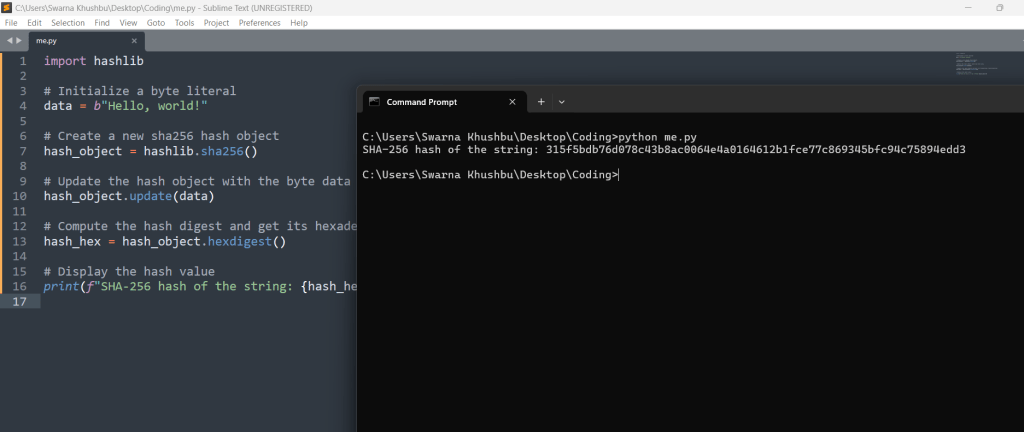
In this example, the string “Hello, world!” is first converted to bytes and stored in the variable data. The sha256 function is then initialized, and the byte data is passed to the update method. The hexdigest method is called to compute the hash and obtain its hexadecimal equivalent, which is then printed to the console.
Conclusion
The hashlib module in Python provides a robust and versatile framework for working with cryptographic hash functions and message digest algorithms. By offering a common interface for various hashing algorithms, hashlib simplifies the process of generating and verifying hash values for strings, files, and other data types. Understanding and utilizing this module is essential for tasks that require data integrity verification, password hashing, digital signatures, and more.
Key Takeaways:
- Comprehensive Support for Hash Algorithms: The
hashlibmodule includes a wide array of hash functions, such as MD5, SHA-1, SHA-256, SHA-512, and more. It ensures compatibility across platforms, providing bothalgorithms_guaranteedandalgorithms_availablesets to identify supported algorithms. - Ease of Use: The module’s design is straightforward, with clear methods for initializing hash objects, updating them with data, and obtaining the final hash digest. This simplicity makes it accessible for both beginners and experienced developers.
- Efficiency and Performance: The ability to update hash objects incrementally with chunks of data makes
hashlibsuitable for hashing large files efficiently. This feature ensures that memory usage is optimized, which is crucial for performance-sensitive applications. - Built-In Security: Using secure hashing algorithms like SHA-256, SHA-3, and BLAKE2 ensures that your applications benefit from state-of-the-art cryptographic security. These algorithms are designed to resist common attacks, such as collision and preimage attacks.
- Practical Applications: The
hashlibmodule is invaluable in numerous real-world scenarios, including:- Data Integrity Verification: Ensuring that data has not been altered during transmission or storage by comparing hash values.
- Password Hashing: Safeguarding passwords by storing their hashes instead of plain text, enhancing security.
- Digital Signatures: Verifying the authenticity and integrity of digital documents and messages.
- File Verification: Checking the integrity of downloaded files by comparing computed hashes with provided hashes.
Practical Example Revisited:
The guide included practical examples of hashing both files and strings, demonstrating how to compute and verify hash values. For instance, the process of obtaining the SHA-256 hash of a file involved reading the file in chunks and updating the hash object iteratively. For strings, the process was even more straightforward, involving a single call to update the hash object with byte data.
Future Considerations:
As Python continues to evolve, so will its libraries and modules, including hashlib. Developers should stay updated with the latest developments in cryptographic standards and best practices to ensure their applications remain secure. Additionally, exploring advanced topics such as HMAC (Hash-based Message Authentication Code) and integrating hashlib with other cryptographic libraries can further enhance your applications’ security and functionality.
In conclusion, mastering the hashlib module equips you with powerful tools to handle various cryptographic needs effectively. Whether you are ensuring data integrity, securing passwords, or implementing digital signatures, hashlib provides the necessary functionality with ease and reliability. By incorporating these techniques into your projects, you can enhance their security and robustness, safeguarding against data breaches and ensuring the trustworthiness of your applications.





Leave a Reply