

Python’s asyncio module is a powerful tool for writing concurrent code using the async and await syntax. It allows you to manage asynchronous tasks, providing an effective way to handle I/O-bound and high-level structured network code. This article will delve into what asyncio is, how it works, and why it’s useful. We’ll also explore some coding examples and real-time use cases to illustrate its practical applications.
What is asyncio?
asyncio is a library to write concurrent code in Python. It provides an event loop, coroutines, tasks, and IO-bound code using async and await keywords. Introduced in Python 3.4, asyncio has become an integral part of modern Python programming for developing scalable network applications.
Why Use asyncio?
- Concurrency: Allows the execution of multiple tasks concurrently, improving efficiency.
- Non-blocking: Manages I/O-bound operations without blocking the execution of other tasks.
- Scalability: Ideal for network applications like web servers or chat applications, where numerous connections need to be managed simultaneously.
- Structured Network Code: Simplifies the handling of network protocols and asynchronous communication.
Key Concepts
- Event Loop: The core of
asyncio. It runs asynchronous tasks and callbacks, performs network IO operations, and executes code in an asynchronous manner. - Coroutines: Special functions defined with
async def, which can pause execution to allow other tasks to run. - Tasks: Wrap coroutines and schedule their execution in the event loop.
- Futures: Represent a result of an asynchronous operation that may not be available yet.
Basic Usage
Here’s a simple example to demonstrate the basics of asyncio.
Example: Basic asyncio Program
import asyncio

async def say_hello():
    print("Hello")
    await asyncio.sleep(1)
    print("World")

# Running the coroutine
asyncio.run(say_hello())
Output:

In this example, say_hello is a coroutine that prints “Hello”, waits for 1 second, and then prints “World”.
Detailed Example
Let’s look at a more detailed example involving multiple coroutines and tasks.
Example: Multiple Coroutines and Tasks
import asyncio

async def fetch_data(delay, name):
    print(f"Starting task {name}")
    await asyncio.sleep(delay)
    print(f"Task {name} completed after {delay} seconds")

async def main():
    task1 = asyncio.create_task(fetch_data(2, "Task 1"))
    task2 = asyncio.create_task(fetch_data(3, "Task 2"))
    task3 = asyncio.create_task(fetch_data(1, "Task 3"))

    print("Waiting for tasks to complete")
    await task1
    await task2
    await task3
    print("All tasks completed")

# Running the main coroutine
asyncio.run(main())
Output:
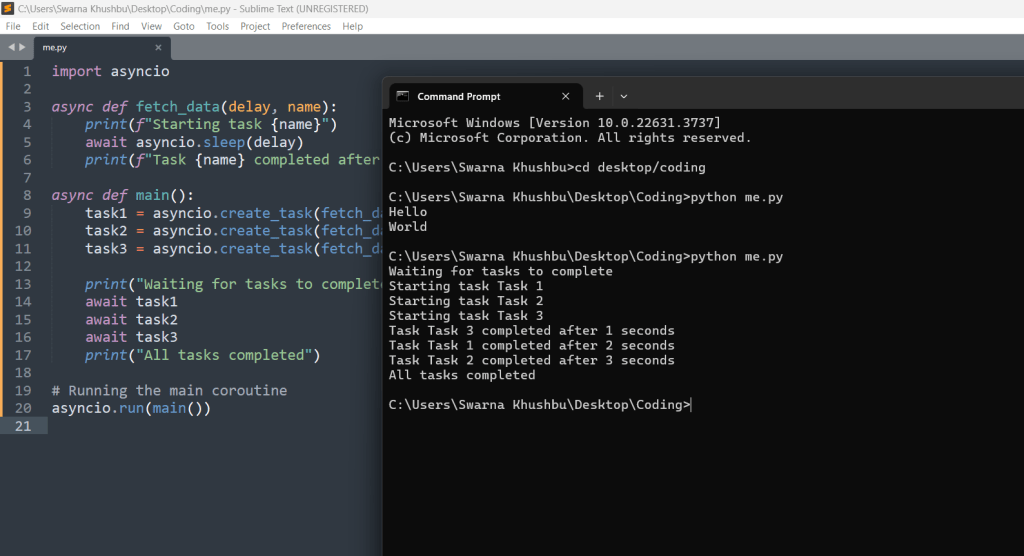
In this example, three tasks are created and scheduled to run concurrently. Each task simulates fetching data with different delays.
Real-Time Example: Web Scraping
Let’s consider a real-time example of web scraping using asyncio and aiohttp.
Example: Asynchronous Web Scraping
import asyncio
import aiohttp

async def fetch_url(session, url):
    async with session.get(url) as response:
        return await response.text()

async def main():
    urls = [
        'http://example.com',
        'http://example.org',
        'http://example.net'
    ]

    async with aiohttp.ClientSession() as session:
        tasks = [fetch_url(session, url) for url in urls]
        responses = await asyncio.gather(*tasks)
        for response in responses:
            print(response)

# Running the main coroutine
asyncio.run(main())
Output:

In this example, aiohttp is used to perform asynchronous HTTP requests. The fetch_url coroutine fetches the content of a URL, and main schedules multiple fetch operations concurrently.
How asyncio Can Be Used
asyncio is widely used in various scenarios where concurrency and non-blocking operations are crucial:
- Web Servers: Frameworks like
aiohttpuseasynciofor handling multiple client requests concurrently. - Chat Applications: Real-time messaging systems can manage numerous connections simultaneously using
asyncio. - Data Processing Pipelines: Asynchronous processing of data streams can be efficiently managed with
asyncio. - Network Communication: Protocols like HTTP, FTP, and WebSocket can be implemented using asynchronous techniques for better performance.
asyncio Examples for Real-Time Applications
Chat Applications: Real-Time Messaging Systems
Real-time chat applications can manage multiple connections and messages concurrently using asyncio. Below is an example of a simple chat server that handles multiple clients simultaneously.
Example: Simple Chat Server
import asyncio

clients = []

async def handle_client(reader, writer):
    address = writer.get_extra_info('peername')
    print(f"Connected by {address}")
    clients.append(writer)

    try:
        while True:
            data = await reader.read(100)
            if not data:
                break
            message = data.decode()
            print(f"Received {message} from {address}")

            for client in clients:
                if client != writer:
                    client.write(data)
                    await client.drain()
    except asyncio.CancelledError:
        pass
    finally:
        print(f"Disconnected by {address}")
        clients.remove(writer)
        writer.close()
        await writer.wait_closed()

async def main():
    server = await asyncio.start_server(handle_client, '127.0.0.1', 8888)
    print("Server started")

    async with server:
        await server.serve_forever()

asyncio.run(main())
In this example, the chat server listens for incoming connections, handles multiple clients, and broadcasts messages to all connected clients.
Data Processing Pipelines: Asynchronous Data Streams
Asynchronous processing of data streams can be efficiently managed with asyncio, allowing for concurrent processing of data chunks.
Example: Asynchronous Data Processing
import asyncio

async def read_data(queue):
    for i in range(1, 6):
        await asyncio.sleep(1)
        data = f"data-{i}"
        await queue.put(data)
        print(f"Produced: {data}")

async def process_data(queue):
    while True:
        data = await queue.get()
        if data is None:
            break
        print(f"Processing: {data}")
        await asyncio.sleep(2)
        queue.task_done()

async def main():
    queue = asyncio.Queue()

    producer = asyncio.create_task(read_data(queue))
    consumer = asyncio.create_task(process_data(queue))

    await producer
    await queue.put(None)
    await consumer

asyncio.run(main())
In this example, read_data simulates producing data chunks, while process_data simulates processing these chunks asynchronously.
Network Communication: Asynchronous Protocols
Implementing protocols like HTTP, FTP, and WebSocket using asyncio can improve performance by handling multiple requests concurrently.
Example: Asynchronous HTTP Server
import asyncio
from aiohttp import web

async def handle(request):
    name = request.match_info.get('name', "Anonymous")
    text = f"Hello, {name}"
    return web.Response(text=text)

async def init_app():
    app = web.Application()
    app.add_routes([web.get('/', handle),
                    web.get('/{name}', handle)])
    return app

async def main():
    app = await init_app()
    runner = web.AppRunner(app)
    await runner.setup()
    site = web.TCPSite(runner, 'localhost', 8080)
    await site.start()
    print("Server started at http://localhost:8080")

    while True:
        await asyncio.sleep(3600)

asyncio.run(main())
The examples provided demonstrate the versatility and power of asyncio in real-time applications. From managing numerous connections in chat applications to processing data streams asynchronously and implementing efficient network communication protocols, asyncio offers robust solutions for concurrent programming. By understanding and leveraging asyncio, developers can build scalable and responsive applications that meet the demands of modern computing.
Conclusion
asyncio is a robust library that brings asynchronous programming to Python, making it a vital tool for modern applications. By using async and await syntax, developers can write non-blocking, concurrent code that scales efficiently. Whether you’re developing a web server, a real-time chat application, or any I/O-bound application, asyncio provides the framework needed to handle multiple tasks concurrently without compromising performance.
Mastering asyncio requires understanding its core concepts, such as the event loop, coroutines, tasks, and futures. By incorporating asyncio into your projects, you can leverage the power of asynchronous programming to build responsive and scalable applications. Experiment with the examples provided, explore further applications, and embrace the potential of asyncio in your Python coding journey.





Leave a Reply