

Creating cartoon characters with Python’s Turtle graphics is a fun and creative way to explore programming concepts. In this tutorial, we’ll create a simple cartoon character using Turtle. Turtle is a built-in Python module that allows us to create drawings and graphics by using a turtle that moves around the screen.
To create a cartoon character, we’ll use basic Turtle commands such as forward(), backward(), right(), left(), circle(), and dot() to draw shapes and lines. We’ll also use the fillcolor() and begin_fill()/end_fill() commands to add color to our character.
Let’s start by creating a simple cartoon character: a smiling face with eyes and a mouth. Here’s the code:
import turtle

# Set up the screen
screen = turtle.Screen()
screen.title("Python Turtle Cartoon")
screen.bgcolor("white")

# Set up the turtle
t = turtle.Turtle()
t.speed(0)
t.width(3)

# Function to draw a circle
def draw_circle(color, x, y, radius):
    t.penup()
    t.goto(x, y - radius)
    t.pendown()
    t.fillcolor(color)
    t.begin_fill()
    t.circle(radius)
    t.end_fill()

# Function to draw an eye
def draw_eye(x, y):
    draw_circle("black", x, y, 10)
    draw_circle("white", x, y, 5)

# Function to draw a mouth
def draw_mouth():
    t.penup()
    t.goto(-50, -30)
    t.pendown()
    t.right(90)
    t.circle(50, 180)

# Draw the head
draw_circle("yellow", 0, 0, 50)

# Draw the eyes
draw_eye(-20, 10)
draw_eye(20, 10)

# Draw the mouth
draw_mouth()

# Hide the turtle
t.hideturtle()

# Display the result
screen.mainloop()

Now let us go ahead with creating everyone’s favorite character Doremon
from turtle import *


# Doraemon with Python Turtle
def ankle(x, y):
    penup()
    goto(x, y)
    pendown()


def eyes():
    fillcolor("#ffffff")
    begin_fill()

    tracer(False)
    a = 2.5
    for i in range(120):
        if 0 <= i < 30 or 60 <= i < 90:
            a -= 0.05
            lt(3)
            fd(a)
        else:
            a += 0.05
            lt(3)
            fd(a)
    tracer(True)
    end_fill()


def daari():
    ankle(-32, 135)
    seth(165)
    fd(60)

    ankle(-32, 125)
    seth(180)
    fd(60)

    ankle(-32, 115)
    seth(193)
    fd(60)

    ankle(37, 135)
    seth(15)
    fd(60)

    ankle(37, 125)
    seth(0)
    fd(60)

    ankle(37, 115)
    seth(-13)
    fd(60)


def mukh():
    ankle(5, 148)
    seth(270)
    fd(100)
    seth(0)
    circle(120, 50)
    seth(230)
    circle(-120, 100)


def scarf():
    fillcolor('#e70010')
    begin_fill()
    seth(0)
    fd(200)
    circle(-5, 90)
    fd(10)
    circle(-5, 90)
    fd(207)
    circle(-5, 90)
    fd(10)
    circle(-5, 90)
    end_fill()


def nose():
    ankle(-10, 158)
    seth(315)
    fillcolor('#e70010')
    begin_fill()
    circle(20)
    end_fill()


def black_eyes():
    seth(0)
    ankle(-20, 195)
    fillcolor('#000000')
    begin_fill()
    circle(13)
    end_fill()

    pensize(6)
    ankle(20, 205)
    seth(75)
    circle(-10, 150)
    pensize(3)

    ankle(-17, 200)
    seth(0)
    fillcolor('#ffffff')
    begin_fill()
    circle(5)
    end_fill()
    ankle(0, 0)


def face():
    fd(183)
    lt(45)
    fillcolor('#ffffff')
    begin_fill()
    circle(120, 100)
    seth(180)
    # print(pos())
    fd(121)
    pendown()
    seth(215)
    circle(120, 100)
    end_fill()
    ankle(63.56, 218.24)
    seth(90)
    eyes()
    seth(180)
    penup()
    fd(60)
    pendown()
    seth(90)
    eyes()
    penup()
    seth(180)
    fd(64)


def taauko():
    penup()
    circle(150, 40)
    pendown()
    fillcolor('#00a0de')
    begin_fill()
    circle(150, 280)
    end_fill()


def Doraemon():
    taauko()

    scarf()

    face()

    nose()

    mukh()

    daari()

    ankle(0, 0)

    seth(0)
    penup()
    circle(150, 50)
    pendown()
    seth(30)
    fd(40)
    seth(70)
    circle(-30, 270)

    fillcolor('#00a0de')
    begin_fill()

    seth(230)
    fd(80)
    seth(90)
    circle(1000, 1)
    seth(-89)
    circle(-1000, 10)

    # print(pos())

    seth(180)
    fd(70)
    seth(90)
    circle(30, 180)
    seth(180)
    fd(70)

    # print(pos())
    seth(100)
    circle(-1000, 9)

    seth(-86)
    circle(1000, 2)
    seth(230)
    fd(40)

    # print(pos())

    circle(-30, 230)
    seth(45)
    fd(81)
    seth(0)
    fd(203)
    circle(5, 90)
    fd(10)
    circle(5, 90)
    fd(7)
    seth(40)
    circle(150, 10)
    seth(30)
    fd(40)
    end_fill()

    seth(70)
    fillcolor('#ffffff')
    begin_fill()
    circle(-30)
    end_fill()

    ankle(103.74, -182.59)
    seth(0)
    fillcolor('#ffffff')
    begin_fill()
    fd(15)
    circle(-15, 180)
    fd(90)
    circle(-15, 180)
    fd(10)
    end_fill()

    ankle(-96.26, -182.59)
    seth(180)
    fillcolor('#ffffff')
    begin_fill()
    fd(15)
    circle(15, 180)
    fd(90)
    circle(15, 180)
    fd(10)
    end_fill()

    ankle(-133.97, -91.81)
    seth(50)
    fillcolor('#ffffff')
    begin_fill()
    circle(30)
    end_fill()
    # Doraemon with Python Turtle

    ankle(-103.42, 15.09)
    seth(0)
    fd(38)
    seth(230)
    begin_fill()
    circle(90, 260)
    end_fill()

    ankle(5, -40)
    seth(0)
    fd(70)
    seth(-90)
    circle(-70, 180)
    seth(0)
    fd(70)

    ankle(-103.42, 15.09)
    fd(90)
    seth(70)
    fillcolor('#ffd200')
    # print(pos())
    begin_fill()
    circle(-20)
    end_fill()
    seth(170)
    fillcolor('#ffd200')
    begin_fill()
    circle(-2, 180)
    seth(10)
    circle(-100, 22)
    circle(-2, 180)
    seth(180 - 10)
    circle(100, 22)
    end_fill()
    goto(-13.42, 15.09)
    seth(250)
    circle(20, 110)
    seth(90)
    fd(15)
    dot(10)
    ankle(0, -150)

    black_eyes()


if __name__ == '__main__':
    screensize(800, 600, "#f0f0f0")
    pensize(3)
    speed(9)
    Doraemon()
    ankle(100, -300)
    mainloop()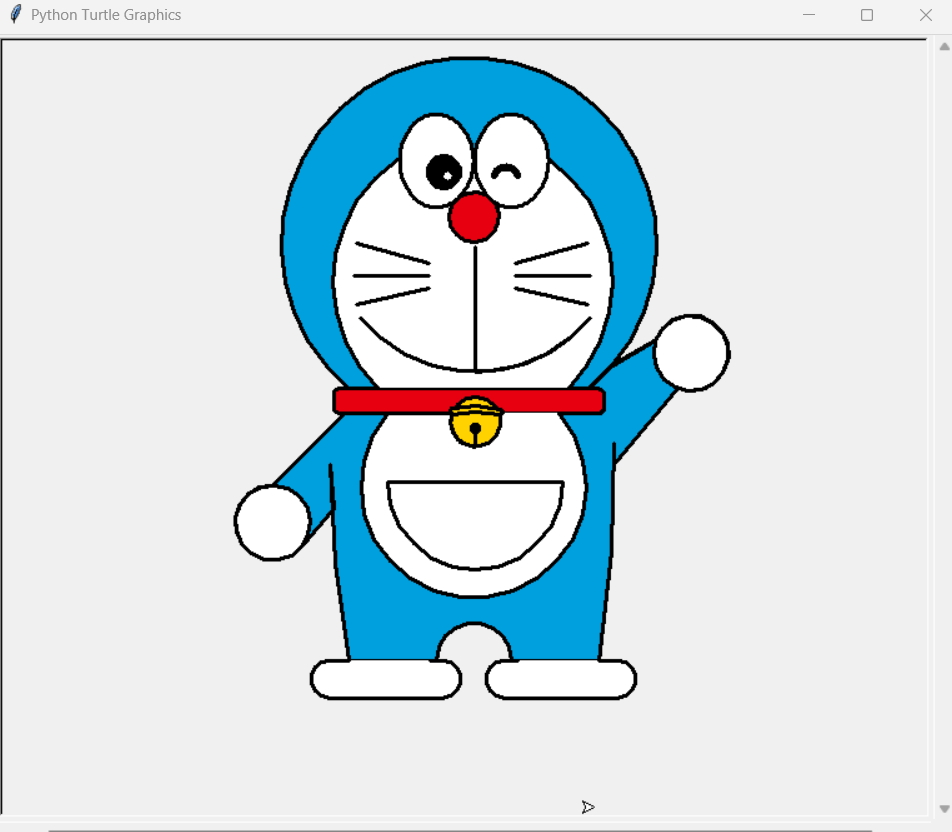
Explanation of the above code:
from turtle import *: Imports the Turtle module and all its functions for easier use.ankle(x, y): A helper function to move the turtle to a specific position(x, y)without drawing.eyes(): Draws the eyes of the character using a combination of circles and loops.daari(): Draws the character’s whiskers using a series of lines.mukh(): Draws the character’s mouth using circles and arcs.scarf(): Draws the character’s scarf using rectangles and circles.nose(): Draws the character’s nose using a circle.black_eyes(): Draws the character’s black eye pupils using circles and lines.face(): Draws the main face of the character using circles and lines.taauko(): Draws the character’s head using circles and fills it with a color.Doraemon(): Defines the main function to draw the entire Doraemon character by calling the above helper functions.if __name__ == '__main__':: Checks if the script is being run directly and not imported as a module.screensize(800, 600, "#f0f0f0"): Sets up the screen size and background color.pensize(3): Sets the pen size for drawing.speed(9): Sets the drawing speed.Doraemon(): Calls theDoraemon()function to draw the character.ankle(100, -300): Moves the turtle to a specific position after drawing to avoid overlapping lines.mainloop(): Keeps the window open so we can see the drawing.
In conclusion, creating cartoon characters with Python Turtle is a fun and creative way to explore programming concepts. By using basic Turtle commands such as forward(), backward(), right(), left(), circle(), and dot(), along with color and fill commands, we can create complex shapes and designs. Breaking down the character into smaller parts and using functions to draw each part allows us to easily manage and modify the character’s appearance. Turtle graphics provide a simple yet powerful tool for creating a wide variety of cartoon characters and illustrations, making it a great choice for beginners and experienced programmers alike to express their creativity through coding.





Leave a Reply