

The pop() method in Python is used to remove and return an arbitrary element from a set. Unlike lists, sets in Python do not have an index or order, so the pop() method removes a random element rather than the last one. This method is particularly useful when you need to remove elements from a set but do not care about the specific element being removed.
The pop() method can be summarized as follows:
- Functionality: It removes a random element from the set.
- Return Value: It returns the element that was removed.
- Behavior: If the set is empty, calling
pop()will raise aKeyError.
Here’s a detailed explanation of how the pop() method works and its usage in Python:
Understanding the pop() Method
The pop() method is designed to work with sets, which are collections of unique elements that are unordered and unindexed. When you call pop() on a set, Python selects an element at random, removes it from the set, and returns that element to the caller. Since sets do not maintain a specific order, you cannot predict which element will be removed.
Syntax
The syntax for the pop() method is simple:
set_variable.pop()
Let’s explore some examples to understand how the pop() method works in practice.
# Create a set with some elements
my_set = {1, 2, 3, 4, 5}

# Remove a random element from the set
removed_element = my_set.pop()

# Display the removed element
print("Removed element:", removed_element)

# Display the set after removing the element
print("Set after pop:", my_set)
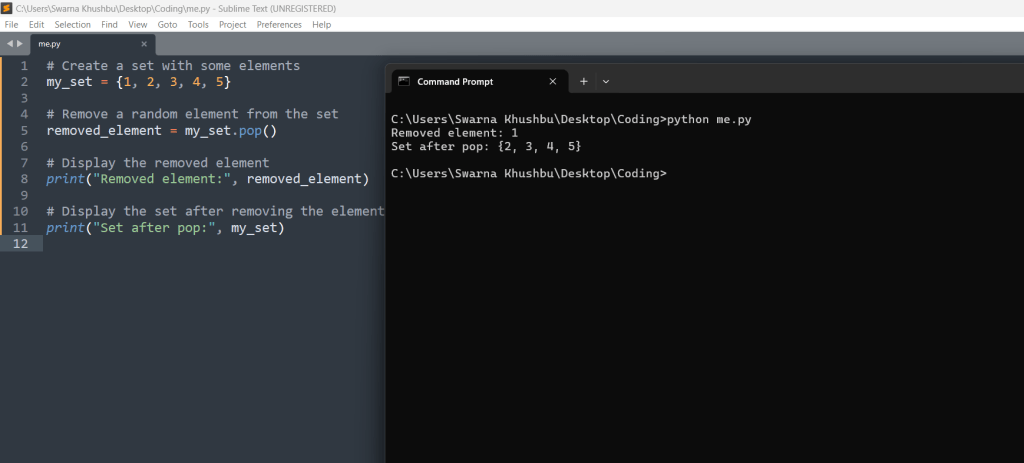
In the above example, the pop() method removes a random element from my_set and returns it. The removed element is stored in removed_element, which is then printed. Finally, the modified set is displayed to show the remaining elements.
Let us see next one –
Handling an Empty Set
# Create an empty set
empty_set = set()

# Try to remove an element from the empty set
try:
    empty_set.pop()
except KeyError as e:
    print("Error:", e)

In this above example, the set empty_set is empty. When pop() is called, it raises a KeyError because there are no elements to remove. The try block catches this exception and prints an error message.
Python Set pop() Method Example
s1 = {91, 11, 0}
s1.pop()
print(s1)

s1 = {11, 21, 31, 4}
print("Before popping: ",s1)
s1.pop()
s1.pop()
s1.pop()

print("After 3 elements popped, s1:", s1)

Exceptions while using Python Set pop() Method

Practical Considerations
- Randomness: Since the element removed is arbitrary, you should not rely on
pop()to remove a specific element. If you need to remove a particular element, use theremove()method instead.
When working with the pop() method in Python sets, it is important to understand that the element removed is chosen at random. Sets in Python are unordered collections, meaning they do not maintain a specific sequence for their elements. Therefore, when you call the pop() method, you cannot predict or control which element will be removed.
my_set = {1, 2, 3, 4, 5}
removed_element = my_set.pop()
print("Removed element:", removed_element)
print("Remaining set:", my_set)
In this code snippet, removed_element could be any one of the numbers in the set. The remaining set will have one less element, but which one is removed is arbitrary. This behavior is important to remember because if you need to remove a specific element from a set, you should not use pop(). Instead, you should use the remove() method, which allows you to specify the element you want to remove:
my_set.remove(3)
This will specifically remove the element 3 from the set, if it exists.
- Efficiency: The
pop()method is efficient for removing elements from a set because it does not require searching for a specific index.
The pop() method is efficient because it does not need to search for an element by index. Sets in Python are implemented using hash tables, which provide average constant-time complexity for insertions and deletions. This means that pop() can remove an element quickly without having to traverse the set.
In contrast, other collection types like lists require searching through elements by index or value, which can be slower, especially for large collections. Here’s a comparison:
# Removing an element from a list by value (less efficient)
my_list = [1, 2, 3, 4, 5]
my_list.remove(3)  # This operation takes longer as the list size grows

# Removing an element from a set by popping (more efficient)
my_set = {1, 2, 3, 4, 5}
my_set.pop()  # This operation is quick regardless of the set size
- Error Handling: Always be aware that calling
pop()on an empty set will raise aKeyError. Use appropriate error handling techniques to manage this situation.
When using pop(), it is crucial to be aware that calling this method on an empty set will raise a KeyError. This is because there are no elements to remove, and attempting to do so is considered an error.
Here is an example:
empty_set = set()

try:
    empty_set.pop()
except KeyError as e:
    print("Error:", e)
In this example, the pop() method is called on an empty set, which raises a KeyError. The try block catches this exception, allowing the program to handle the error gracefully instead of crashing.
To avoid running into this issue, you can check if the set is empty before calling pop():
if my_set:
    my_set.pop()
else:
    print("The set is empty.")
This conditional check ensures that pop() is only called when there are elements to remove, thus preventing the KeyError from occurring.
Summary
- Randomness: The
pop()method removes a random element from a set, which means you cannot control which element is removed. If you need to remove a specific element, use theremove()method. - Efficiency: The
pop()method is efficient because it operates in constant time, making it suitable for quick deletions from sets. - Error Handling: Calling
pop()on an empty set raises aKeyError. Always check if the set is empty before callingpop()or handle theKeyErrorusing a try-except block.
Conclusion
The pop() method is a useful tool for working with sets in Python, allowing you to remove and retrieve arbitrary elements efficiently. Understanding how and when to use this method can help you manage sets effectively in your programs. Whether you are cleaning up a dataset, managing unique elements, or performing set operations, the pop() method is a valuable addition to your Python toolkit.





Leave a Reply