

In the realm of data analysis and manipulation, the unique() function in Pandas stands out as a vital tool for identifying distinct elements within a dataset. Whether you are cleaning up data, removing duplicates, or simply exploring the diversity of values in a column, the unique() function in Pandas offers a straightforward and efficient solution.
This powerful function allows you to extract unique values from a Series or DataFrame column, ensuring that each value is represented only once. In this article, we will delve deep into the unique() function in Pandas, exploring its usage, advantages, and practical applications. By understanding the unique() function in Pandas in depth, you can enhance your data analysis capabilities and streamline your workflow, making your data preparation and exploration tasks more effective and efficient.
In this article, we will explore various techniques and strategies for efficiently extracting distinct elements from a given list. We will cover methods ranging from traditional loops to modern Pythonic approaches to demonstrate the flexibility and power of Python.
Input and Output
Input: [1, 2, 1, 1, 3, 4, 3, 3, 5]
Output: [1, 2, 3, 4, 5]
Explanation: The output list contains only the unique elements from the input list, preserving their original order of appearance.
Get Unique Values from a List by Traversal
The simplest method to extract unique values from a list is to traverse the list, checking each element and adding it to a new list if it has not already been added.
Example:
def unique_traversal(lst):
    unique_list = []
    for item in lst:
        if item not in unique_list:
            unique_list.append(item)
    return unique_list

input_list = [1, 2, 1, 1, 3, 4, 3, 3, 5]
print(unique_traversal(input_list))
Output:

In this example, we use a for loop to iterate through the input list. For each element, we check if it is already in the unique_list. If it is not, we append it.
Using Set Method
Sets in Python automatically remove duplicate values. Converting a list to a set and then back to a list is a quick way to remove duplicates, though it does not preserve order.
Example:
def unique_set(lst):
    return list(set(lst))

input_list = [1, 2, 1, 1, 3, 4, 3, 3, 5]
print(unique_set(input_list))
Output:
[1, 2, 3, 4, 5]
Using reduce() Function
The reduce() function from the functools module can be used to apply a function cumulatively to the items of a list, from left to right, so as to reduce the list to a single value.
Example:
from functools import reduce

def unique_reduce(lst):
    return list(reduce(lambda x, y: x if y in x else x + [y], lst, []))

input_list = [1, 2, 1, 1, 3, 4, 3, 3, 5]
print(unique_reduce(input_list))
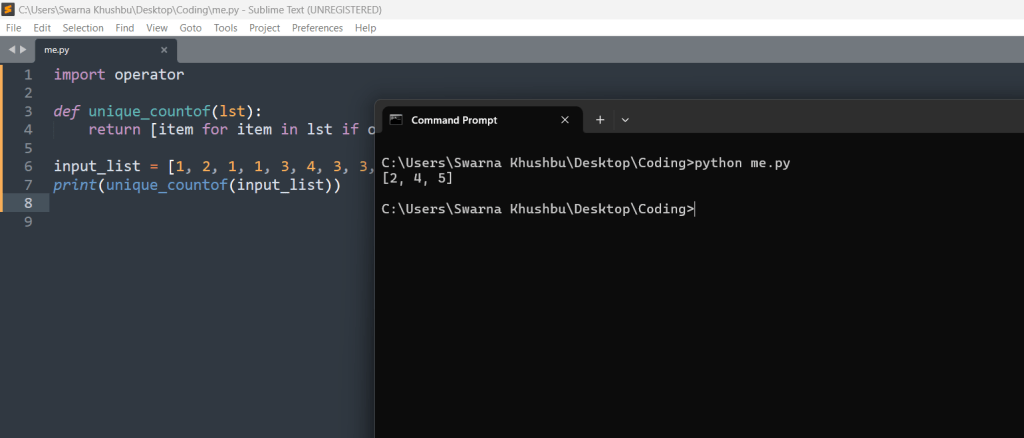
Using operator.countOf() Method
The countOf() method from the operator module can be used to count the occurrences of an element in a list. Using this method, we can ensure that each element appears only once in the result list.
Example:
import operator

def unique_countof(lst):
    return [item for item in lst if operator.countOf(lst, item) == 1]

input_list = [1, 2, 1, 1, 3, 4, 3, 3, 5]
print(unique_countof(input_list))
output:
Using pandas Module
The pandas library offers powerful data manipulation capabilities. The unique() function can be used to find unique values.
Example:
import pandas as pd

def unique_pandas(lst):
    return pd.unique(lst).tolist()

input_list = [1, 2, 1, 1, 3, 4, 3, 3, 5]
print(unique_pandas(input_list))
# Output: [1, 2, 3, 4, 5]
Using numpy.unique
The numpy library also provides a unique() function that returns the sorted unique elements of an array.
Example:
import numpy as np

def unique_numpy(lst):
    return np.unique(lst).tolist()

input_list = [1, 2, 1, 1, 3, 4, 3, 3, 5]
print(unique_numpy(input_list))
# Output: [1, 2, 3, 4, 5]
Using collections.Counter()
The Counter class from the collections module can count the occurrences of each element. By iterating over the keys of the Counter object, we can extract unique elements.
Example:
from collections import Counter

def unique_counter(lst):
    return list(Counter(lst).keys())

input_list = [1, 2, 1, 1, 3, 4, 3, 3, 5]
print(unique_counter(input_list))
# Output: [1, 2, 3, 4, 5]
Using dict.fromkeys()
The dict.fromkeys() method can be used to create a dictionary from a list, where the list elements become keys. Since dictionary keys must be unique, this effectively removes duplicates.
Example:
def unique_dict_fromkeys(lst):
    return list(dict.fromkeys(lst))

input_list = [1, 2, 1, 1, 3, 4, 3, 3, 5]
print(unique_dict_fromkeys(input_list))
# Output: [1, 2, 3, 4, 5]
How do I check if a list contains duplicates in Python?
def contains_duplicates(lst):
    return len(lst) != len(set(lst))
# Example usage
my_list = [1, 2, 3, 3, 4, 5]
print(contains_duplicates(my_list))
Output:

How do I count unique items in a list in Python?
my_list = [1, 2, 2, 3, 4, 4, 5]
unique_count = len(set(my_list))
print(unique_count)  # Output: 5
Conclusion
The unique() function in Pandas is a powerful and efficient tool for extracting unique values from a data series. This function provides a quick and easy way to identify distinct elements within your data, which can be particularly useful in data cleaning, preprocessing, and analysis. By converting the values of a data column into an array of unique values, it helps eliminate duplicates and ensures that each value is represented only once.
In this article, we explored the various aspects and applications of the unique() function in Pandas. We covered how to apply it to different data structures, such as Series and DataFrame columns, to extract unique values. We also discussed its advantages over other methods, such as using sets or other list-based approaches, in terms of both simplicity and performance.
The unique() function is versatile and can be used in various scenarios, such as removing duplicates, finding unique categories or labels, and preparing data for further analysis or visualization. Its integration with other Pandas functions and operations makes it a valuable tool in any data scientist’s or analyst’s toolkit.
Moreover, we provided coding examples that illustrated how to use the unique() function effectively. These examples demonstrated its straightforward syntax and its ability to handle different types of data, including numerical, categorical, and mixed data types. By following these examples, you can quickly grasp how to implement the unique() function in your own projects.
In summary, understanding and utilizing the unique() function in Pandas can significantly enhance your data manipulation and analysis capabilities. Whether you are cleaning up a dataset, preparing data for machine learning models, or simply exploring the characteristics of your data, the unique() function is an indispensable tool that can help you achieve your goals efficiently and effectively. As you continue to work with data in Python, mastering the unique() function and other Pandas operations will undoubtedly contribute to more streamlined and productive data workflows.





Leave a Reply