

What is a Virtual environment?
I will make it very simple for you, you must have heard of a sandbox. Imagine you have a sandbox where you can play with different toys without affecting your room. A virtual environment in Python is like a sandbox for your Python projects. It’s a way to create a separate space with its own set of Python libraries and dependencies, so you can work on different projects without them interfering with each other. It’s like having multiple sandboxes for different types of toys, keeping them organized and separate.
How to create a virtual environment in Python?
Step 1 – Like we install other libraries in Python using the pip command, similarly, a virtual environment needs to be installed. Using the below command in your command terminal(cmd)
pip install virtualenv Since I already have it installed it shows that the requirement is satisfied

Step 2 – Creating a Virtual Environment:
To create a virtual environment, the module venv is used. It is available with the most recent version of Python. We can decide the location to create a virtual environment and run the venv module as a script with the directory path. Type the following command in your command line and hit the enter button.
python.exe -m venv new-env The above command will create the new-env directory; it also creates the directory inside the newly created virtual environment new-env, containing a new copy of a Python interpreter.
Just like below if you are using the command prompt
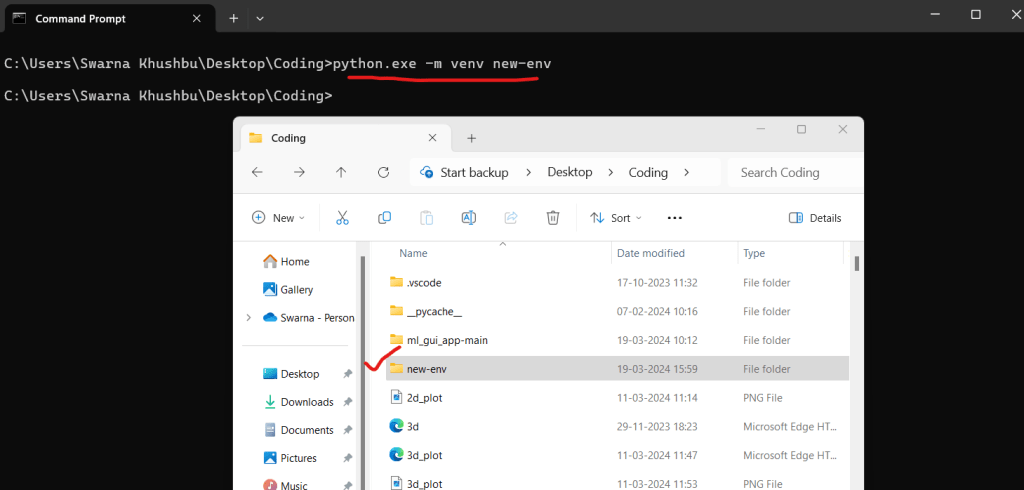
If you are using Visual Studio then you can write in the terminal and see a virtual env created on the left hand side
or your can also use this alternative step for the above Once virtualenv is installed, you can create a virtual environment by running the following command:
virtualenv new_env Step 3 – How to Activate the virtual environment
In order to activate the virtual environment you can use the below command, and press enter in windows after installing and creating a new virtualenv.
.\new-env\Scripts\activate

in the image you see a virtual environment is created with name (new-env)
Step 4 – How to Manage Packages Using pip when you are in virtual environment
Now that you have the virtual environment activated, do think that now how will i install any package, becuase installing packages will not affect the global Python installation or other projects. We can install, upgrade, and delete the libraries in the activated virtual environment using the Python package manager called pip. For example, to install the popular requests module, you can run the following command:
pip install requests 
If we re-run the previous command again, it will display that the required version is already installed.
What is the Importance of creating a virtual environment?
Creating a virtual environment is important because it helps you keep your Python projects organized and separate. Just like you might use different folders to keep your school work and your hobbies organized, a virtual environment lets you create a separate space for each project. This means that if one project needs a specific version of a library, it won’t affect other projects that might need a different version. It also helps you avoid conflicts between different projects, keeping everything running smoothly.
Difference Between virtualenv and venv:

Conclusion:
Creating a virtual environment becomes important when working with applications having different version requirements. In this article, we explored different methods to create a virtual environment in Python. The process of creating a virtual environment includes installing virtualenv (a third-party library) or using venv (an in-built Python module). Followed by activating the newly created virtual environment. Once the virtual environment is activated, packages and modules can be installed using the package manager ‘pip’ within the virtual environment.
By following the steps outlined in this article, programmers can easily create a virtual environment and enjoy cleaner project setups.






Leave a Reply