

What is a CSV File?
CSV stands for Comma-Separated Values. It is a simple file format used to store tabular data, such as a spreadsheet or database. Each line in a CSV file corresponds to a row in the table, and each field within a line is separated by a comma (,).
CSV files are widely used because they are easy to read and write, and they can be opened with most spreadsheet programs like Microsoft Excel, Google Sheets, and LibreOffice Calc.
Working with CSV files in Python
Python provides several libraries for working with CSV files, including the built-in csv module and the popular pandas library. These libraries make it easy to read, write, and manipulate CSV files in Python.
Reading a CSV file
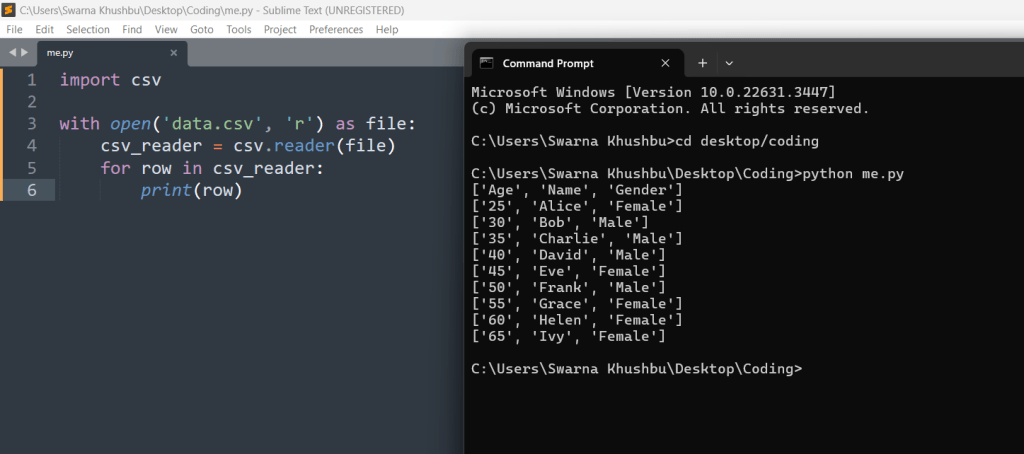
To read a CSV file in Python, you can use the csv module’s reader function. This function returns an iterable object that allows you to iterate over the rows in the CSV file.
Here’s an example of how to read a CSV file using the csv module:
import csv

with open('data.csv', 'r') as file:
    csv_reader = csv.reader(file)
    for row in csv_reader:
        print(row)
In this example, data.csv is the name of the CSV file. The csv.reader function is used to create a reader object, and the for loop is used to iterate over each row in the CSV file and print it.
Reading CSV Files Into a Dictionary With csv
You can also read a CSV file into a dictionary in Python using the DictReader class from the csv module. This class creates an object that behaves like a regular reader but maps the information in each row to a dictionary whose keys are given by the first row (the header) in the CSV file.
Here’s an example of how to read a CSV file into a dictionary using the DictReader class:
import csv

with open('data.csv', 'r') as file:
    csv_reader = csv.DictReader(file)
    for row in csv_reader:
        print(row)

In this example, each row is represented as a dictionary where the keys are the column headers from the CSV file.
Writing to a CSV file
To write data to a CSV file in Python, you can use the csv.writer class. This class allows you to write rows of data to a CSV file.
Here’s an example of how to write to a CSV file using the csv.writer class
import csv

data = [
    ['Name', 'Age', 'City'],
    ['Alice', 25, 'New York'],
    ['Bob', 30, 'Chicago'],
    ['Charlie', 35, 'Los Angeles']
]

with open('output.csv', 'w', newline='') as file:
    csv_writer = csv.writer(file)
    csv_writer.writerows(data)
output:
In this example, the writerows method is used to write the data to the CSV file. Each inner list in the data list represents a row in the CSV file.
Writing a dictionary to a CSV file
You can also write a dictionary to a CSV file in Python using the DictWriter class from the csv module. This class allows you to write dictionaries to a CSV file, where each key in the dictionary corresponds to a column in the CSV file.
Here’s an example of how to write a dictionary to a CSV file using the DictWriter class:
import csv

data = [
    {'Name': 'Alice', 'Age': 25, 'City': 'New York'},
    {'Name': 'Bob', 'Age': 30, 'City': 'Chicago'},
    {'Name': 'Charlie', 'Age': 35, 'City': 'Los Angeles'}
]

with open('output.csv', 'w', newline='') as file:
    fieldnames = ['Name', 'Age', 'City']
    csv_writer = csv.DictWriter(file, fieldnames=fieldnames)
    csv_writer.writeheader()
    csv_writer.writerows(data)
the writeheader method is used to write the column headers to the CSV file, and the writerows method is used to write the data rows.
Reading CSV Files With Pandas
Pandas is a powerful data manipulation library in Python that provides high-performance data structures and data analysis tools. It also provides functions for reading and writing CSV files.
Here’s an example of how to read a CSV file using Pandas:
import pandas as pd

data = pd.read_csv('data.csv')
print(data)
In this example, data.csv is the name of the CSV file. The read_csv function is used to read the CSV file into a pandas DataFrame, which is a two-dimensional tabular data structure.
Writing CSV Files with Pandas
Pandas also provides functions for writing data to CSV files. You can use the to_csv method of a DataFrame to write the data to a CSV file.
Here’s an example of how to write a DataFrame to a CSV file using Pandas:
import pandas as pd

data = {
    'Name': ['Alice', 'Bob', 'Charlie'],
    'Age': [25, 30, 35],
    'City': ['New York', 'Chicago', 'Los Angeles']
}

df = pd.DataFrame(data)
df.to_csv('output.csv', index=False)

In this example, the to_csv method is used to write the DataFrame to a CSV file named output.csv. The index=False argument is used to exclude the index column from the CSV file.
Storing Emails in CSV files
You can store emails in CSV files by writing them as a list of strings or as dictionaries. For example, to store emails as a list of strings:
import csv

emails = [
    'alice@gmail.com',
    'bob@yahoo.com',
    'charlie@hotmail.com'
]

with open('emails.csv', 'w', newline='') as file:
    csv_writer = csv.writer(file)
    csv_writer.writerow(['Email'])
    csv_writer.writerows([[email] for email in emails])
Output:
In this example, each email is written as a single-element list to the CSV file. Alternatively, you can store emails as dictionaries:
import csv

emails = [
    {'Email': 'alice@example.com'},
    {'Email': 'bob@example.com'},
    {'Email': 'charlie@example.com'}
]

with open('emails.csv', 'w', newline='') as file:
    fieldnames = ['Email']
    csv_writer = csv.DictWriter(file, fieldnames=fieldnames)
    csv_writer.writeheader()
    csv_writer.writerows(emails)
In both examples, each row in the CSV file represents an email. The first example uses a list of strings, while the second example uses a list of dictionaries, where each dictionary has a key named ‘Email’.
Conclusion
In this article, we discussed what CSV files are and how to work with them in Python. We covered how to read and write CSV files using the built-in csv module and the pandas library. We also discussed how to store emails in CSV files using both lists and dictionaries. CSV files are a convenient way to store and exchange tabular data, and Python provides powerful tools for working with them.





Leave a Reply