

In this tutorial codemagnet is here to explain you all how Python context managers work in python and how to create and use Context Managers.
Python context managers are a powerful tool for managing resources and ensuring that they are properly acquired and released. They are commonly used for tasks such as opening and closing files, handling network connections, and managing locks in a thread-safe manner. The with statement in Python is used to create a context in which these resources are managed automatically.
What is a Context Manager?
A context manager is an object that defines the runtime context to be established when executing a with statement. The context manager handles the entry into and the exit from the desired runtime context, ensuring that resources are properly acquired and released. It typically implements two methods:
__enter__(): This method is executed when the execution flow enters the context of thewithstatement. It usually acquires the resource.__exit__(exc_type, exc_value, traceback): This method is executed when the execution flow exits the context of thewithstatement. It usually releases the resource.
Built-in Context Managers
Python provides several built-in context managers, such as the open function for file handling. Here’s an example of using the built-in context manager for opening and reading a file:
# Using the built-in context manager for file handling
with open('example.txt', 'r') as file:
    content = file.read()
    print(content)

In this example, the with statement ensures that the file is properly closed after reading, even if an exception occurs.
Creating Custom Context Managers
You can create custom context managers by implementing the __enter__ and __exit__ methods in a class. Here’s an example of a simple context manager for opening and closing a database connection:
class DatabaseConnection:
    def __enter__(self):
        print("Opening database connection")
        # Simulate opening a database connection
        self.connection = "Database Connection"
        return self.connection

    def __exit__(self, exc_type, exc_value, traceback):
        print("Closing database connection")
        # Simulate closing the database connection
        self.connection = None

# Using the custom context manager
with DatabaseConnection() as conn:
    print(f"Connection: {conn}")
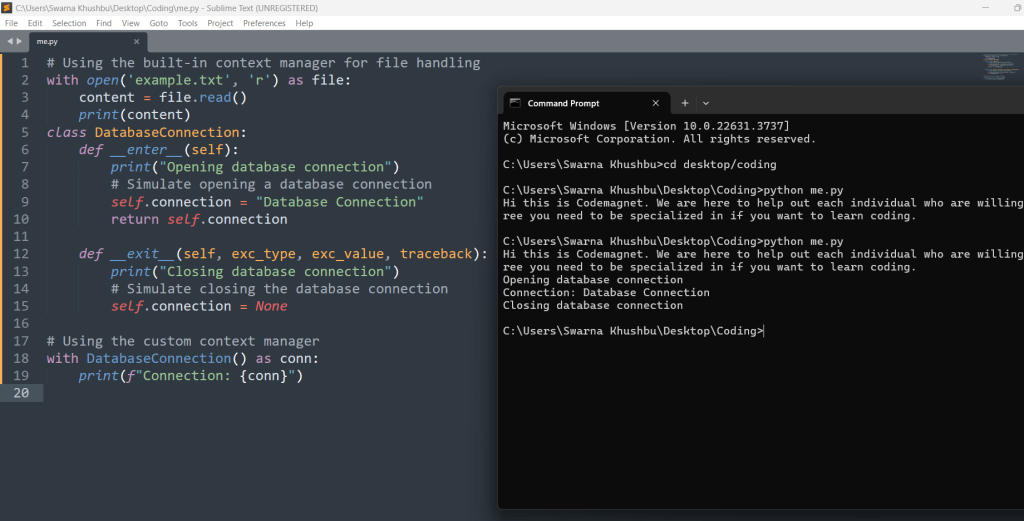
In this example, the DatabaseConnection class implements the __enter__ and __exit__ methods, ensuring that the database connection is opened and closed properly.
Using the contextlib Module
Python’s contextlib module provides utilities for creating and using context managers. The contextlib.contextmanager decorator allows you to create a context manager using a generator function. Here’s an example:
from contextlib import contextmanager

@contextmanager
def database_connection():
    print("Opening database connection")
    # Simulate opening a database connection
    connection = "Database Connection"
    try:
        yield connection
    finally:
        print("Closing database connection")
        # Simulate closing the database connection

# Using the context manager created with contextlib
with database_connection() as conn:
    print(f"Connection: {conn}")
In this example, the database_connection function is decorated with @contextmanager, and it uses a yield statement to provide the resource to the with block. The code after yield is executed when the with block is exited, ensuring that the resource is properly released.
Example: Managing File Operations
Let’s create a custom context manager to handle file operations more explicitly:
class FileManager:
    def __init__(self, filename, mode):
        self.filename = filename
        self.mode = mode

    def __enter__(self):
        self.file = open(self.filename, self.mode)
        return self.file

    def __exit__(self, exc_type, exc_value, traceback):
        self.file.close()
        if exc_type:
            print(f"An exception occurred: {exc_value}")

# Using the custom file manager
with FileManager('example.txt', 'w') as f:
    f.write('Hello, World!')

with FileManager('example.txt', 'r') as f:
    content = f.read()
    print(content)
In this example, the FileManager class manages file opening and closing. It handles any exceptions that occur within the with block, ensuring that the file is always closed properly.
Benefits of Using Context Managers
- Resource Management: Context managers ensure that resources are acquired and released properly, preventing resource leaks.
- Error Handling: They provide a clean way to handle errors and exceptions, ensuring that resources are released even if an error occurs.
- Code Readability: Using context managers makes your code more readable and maintainable by clearly defining the scope of resource usage.
- Reusability: Custom context managers can be reused across different parts of your codebase, promoting code reuse.
Conclusion
Context managers in Python are a powerful tool for managing resources and ensuring that they are properly acquired and released. Whether using built-in context managers, creating custom ones, or utilizing the contextlib module, understanding and leveraging context managers can greatly improve the reliability and readability of your code. By following the examples and concepts outlined in this article, you can effectively manage resources in your Python applications.






Leave a Reply