

Python Generators are a special class of functions in Python that return an iterable set of items, one at a time, in a special way. They are a powerful tool for creating iterators, allowing for efficient iteration over potentially large datasets without loading everything into memory at once. The yield statement is at the heart of Python generators.
Understanding Generators
Python Generators are a simpler way to create iterators. Unlike regular functions that return a single value and terminate, generators yield multiple values, pausing and resuming their state between each value. This is done using the yield statement instead of return.

codemagent.in
Advantages of Generators
- Memory Efficiency: Generators allow you to iterate through data without storing it all in memory at once.
- Lazy Evaluation: Values are generated on-the-fly and only when required.
- Infinite Sequences: Generators can represent infinite sequences, such as streams of data from a sensor.
Creating Generators
Python Generators are created using functions and the yield statement. Here’s a simple example:
def simple_generator():
    yield 1
    yield 2
    yield 3

# Using the generator
gen = simple_generator()
print(next(gen))  # Output: 1
print(next(gen))  # Output: 2
print(next(gen))  # Output: 3
Output:

In this example, simple_generator is a generator function that yields three values. The next() function is used to retrieve the next value from the generator.
How Generators Work
When a generator function is called, it returns a generator object without executing the function. When next() is called on the generator object, the function executes until it reaches the yield statement, which returns the yielded value. The function’s state is saved, allowing it to resume where it left off the next time next() is called.
Using Generators in Loops
Generators are often used in loops. Here’s an example of using a generator within a for loop:
def countdown(n):
    while n > 0:
        yield n
        n -= 1

# Using the generator in a loop
for number in countdown(5):
    print(number)
Output:
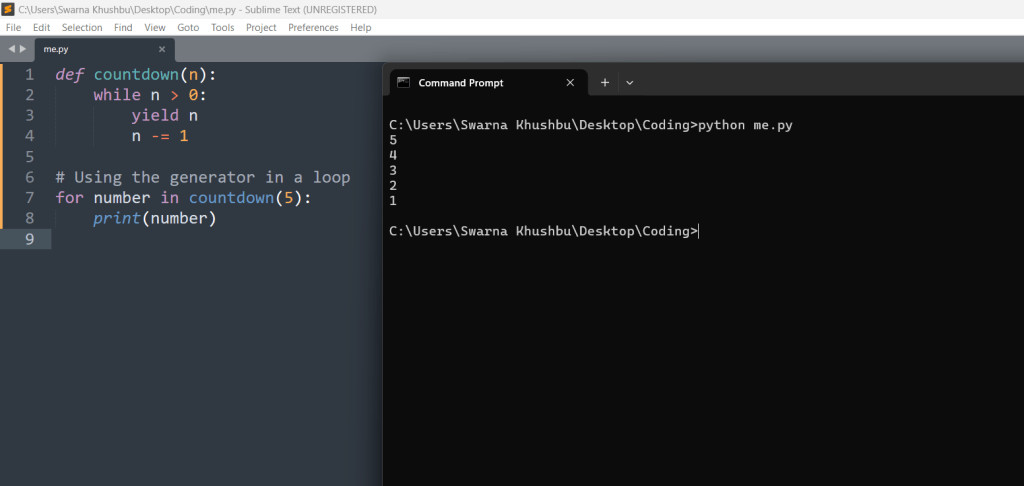
This countdown generator yields numbers from n down to 1. Using it in a for loop allows you to iterate over the generated sequence.
Infinite Generators
Generators can be used to create infinite sequences. Here’s an example:
def infinite_sequence():
    num = 0
    while True:
        yield num
        num += 1

# Using the infinite generator
gen = infinite_sequence()
for i in range(10):  # Limiting to 10 iterations for demonstration
    print(next(gen))
Output:

The infinite_sequence generator yields an unending sequence of numbers. For demonstration purposes, the loop is limited to 10 iterations.
Generator Expressions
Similar to list comprehensions, Python also supports generator expressions. They provide a concise way to create generators:
# List comprehension
squares_list = [x**2 for x in range(10)]

# Generator expression
squares_gen = (x**2 for x in range(10))

print(squares_list)  # Output: [0, 1, 4, 9, 16, 25, 36, 49, 64, 81]
print(squares_gen)   # Output: <generator object <genexpr> at 0x7f8b7e2c8f20>

# Iterating over the generator expression
for square in squares_gen:
    print(square)
Output:

In this example, squares_list is a list comprehension that generates a list of squares, whereas squares_gen is a generator expression that generates squares lazily.
Practical Example: Reading Large Files
Generators are particularly useful for working with large files. Here’s an example of a generator that reads a large file line by line:
def read_large_file(file_path):
    with open(file_path, 'r') as file:
        for line in file:
            yield line

# Using the generator to read a file
file_path = 'large_file.txt'
for line in read_large_file(file_path):
    print(line.strip())
Output:

This read_large_file generator yields one line at a time, making it memory-efficient for reading large files.
Let us take some other examples:
Generating Prime Numbers
A generator can be used to create an infinite sequence of prime numbers.
def is_prime(n):
    if n < 2:
        return False
    for i in range(2, int(n ** 0.5) + 1):
        if n % i == 0:
            return False
    return True

def prime_numbers():
    num = 2
    while True:
        if is_prime(num):
            yield num
        num += 1

# Using the prime number generator
primes = prime_numbers()
for _ in range(10):
    print(next(primes))

Explanation:
- The function starts by checking if
nis less than 2. - Since 0 and 1 are not prime numbers, it returns
Falsefor these values. - The function then iterates from 2 to the square root of
n(rounded down) plus one. This is an optimization because a larger factor ofnmust be a multiple of a smaller factor that has already been checked.
For eachiin this range, it checks ifnis divisible byi(n % i == 0). If it is,nis not prime, and the function returnsFalse. - If the loop completes without finding any divisors,
nis a prime number, and the function returnsTrue - The generator starts with
numinitialized to 2, the first prime number.
It enters an infinite loop (while True:).
For each value ofnum, it callsis_prime(num).Ifnumis prime, the generator yieldsnum.
After checking (and potentially yielding) the currentnum, it incrementsnumby 1 and repeats the process. primes = prime_numbers()creates a generator object that can produce prime numbers.for _ in range(10):runs a loop 10 times.In each iteration,next(primes)is called to get the next prime number from the generator.
The prime number is then printed.
Implementing a Range-like Generator
You can implement a custom range generator that works similarly to Python’s built-in range function.
def custom_range(start, end, step=1):
    current = start
    while current < end:
        yield current
        current += step

# Using the custom range generator
for number in custom_range(1, 10, 2):
    print(number)
Explanation:
Function: custom_range(start, end, step=1)
- Function Definition:
- The function
custom_rangeis defined with three parameters:start,end, and an optionalstepparameter (default is 1).
- The function
- Initialization:
currentis initialized to the value ofstart.
- Loop Condition:
- The
whileloop runs as long ascurrentis less thanend.
- The
- Yield Statement:
- The
yieldstatement produces the current value ofcurrentand pauses the function’s execution, allowing it to resume from this point whennext()is called again on the generator.
- The
- Increment:
- After yielding the current value,
currentis incremented bystep.
- After yielding the current value,
Using the Custom Range Generator
- Creating the Generator:
custom_range(1, 10, 2)creates a generator that will yield numbers starting from 1, up to (but not including) 10, incrementing by 2 each time.
- For Loop:
- The
forloop iterates over the values generated bycustom_range(1, 10, 2).
- The
- Printing Values:
- In each iteration of the loop, the current value yielded by the generator is printed.
Code Execution
- The
custom_rangegenerator will yield the sequence: 1, 3, 5, 7, 9. - These values are printed one by one in the
forloop.
Output:
1
3
5
7
9
Summarized Benefits of Using Python Generators
- Memory Efficiency: Generators are memory-efficient because they yield items one at a time and don’t store the entire sequence in memory.
- Lazy Evaluation: Values are generated only when needed, which is ideal for large datasets or streams of data.
- Improved Performance: Generators can improve performance in scenarios where the cost of computing or retrieving each item is high.
- Simplified Code: Generators can simplify code that requires custom iteration logic.
Conclusion
Generators in Python are a powerful feature that allows you to create iterators with minimal memory usage. By using the yield statement, you can generate values on-the-fly, making your code more efficient and capable of handling large datasets or infinite sequences. Understanding and leveraging generators can greatly enhance your ability to write efficient, scalable Python programs.





Leave a Reply