

In Python, the super() function is used to call a method from a parent class. When dealing with multilevel inheritance, where a class inherits from another class, which in turn inherits from another class, the super() function becomes particularly useful for accessing methods in the parent classes in a consistent and predictable way. This article will explain how the super() function works in the context of multilevel inheritance with examples.
Understanding Multilevel Inheritance
Before diving into the super() function, let’s understand multilevel inheritance. In multilevel inheritance, a derived class inherits from a base class, and another class inherits from this derived class, forming a chain of inheritance. Each class in the chain can have its own methods and attributes, and they are organized in a hierarchical manner.
Example Scenario
Consider the following example where we have a Person class as the base class, an Employee class inheriting from Person, and a Manager class inheriting from Employee. Each class adds its own attributes and methods, and we want to access the methods of the parent classes using super().
Example Code
class Person:
    def __init__(self, name, age):
        self.name = name
        self.age = age

    def display_info(self):
        print(f"Name: {self.name}, Age: {self.age}")

class Employee(Person):
    def __init__(self, name, age, emp_id):
        super().__init__(name, age)
        self.emp_id = emp_id

    def display_info(self):
        super().display_info()
        print(f"Employee ID: {self.emp_id}")

class Manager(Employee):
    def __init__(self, name, age, emp_id, department):
        super().__init__(name, age, emp_id)
        self.department = department

    def display_info(self):
        super().display_info()
        print(f"Department: {self.department}")

# Create an instance of Manager
manager = Manager("Alice", 30, "E123", "HR")
manager.display_info()
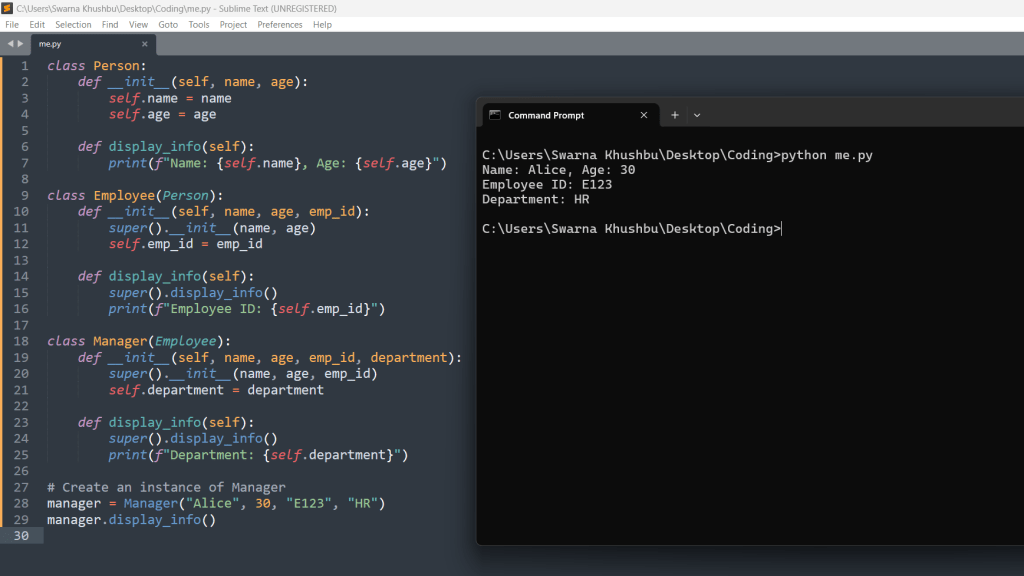
Explanation
- The
Personclass has an__init__method to initializenameandage, and adisplay_infomethod to display the person’s information. - The
Employeeclass inherits fromPersonand adds anemp_idattribute. It also overrides thedisplay_infomethod to include theemp_id. - The
Managerclass inherits fromEmployeeand adds adepartmentattribute. It also overrides thedisplay_infomethod to include thedepartment. - In each class, we use
super().__init__()to call the constructor of the immediate parent class, ensuring that all attributes are initialized correctly. - We also use
super().display_info()to call thedisplay_infomethod of the immediate parent class, ensuring that all relevant information is displayed.
Let us take a look at another example
class Animal:
    def __init__(self, species):
        self.species = species

    def speak(self):
        raise NotImplementedError("Subclass must implement abstract method")

class Dog(Animal):
    def __init__(self, name, species="Dog"):
        super().__init__(species)
        self.name = name

    def speak(self):
        return "Woof!"

class Labrador(Dog):
    def __init__(self, name, color):
        super().__init__(name)
        self.color = color

    def speak(self):
        return super().speak() + " " + "I am a Labrador!"

# Creating instances
dog = Dog("Buddy")
labrador = Labrador("Max", "Golden")

# Output
print(f"{dog.name} says: {dog.speak()}")
print(f"{labrador.name} says: {labrador.speak()} He is {labrador.color}.")

Explanation of the above code:
Imagine we have animals and dogs as a type of animal. Dogs can bark, so we define a speak method for dogs that returns “Woof!”. Now, Labrador is a type of dog that has its own characteristics, like color. When a Labrador barks, it should still sound like a dog, so we use super() to call the bark method of a regular dog and then add “I am a Labrador!” to the bark sound.
Using super() for Initialization in Multilevel Inheritance
class Shape:
    def __init__(self, shape_type):
        self.shape_type = shape_type

    def info(self):
        return f"I am a {self.shape_type}"

class Circle(Shape):
    def __init__(self, radius):
        super().__init__("Circle")
        self.radius = radius

    def info(self):
        return super().info() + f" with radius {self.radius}"

class Cylinder(Circle):
    def __init__(self, radius, height):
        super().__init__(radius)
        self.height = height

    def info(self):
        return super().info() + f" and height {self.height}"

# Creating instances
circle = Circle(5)
cylinder = Cylinder(3, 7)

# Output
print(circle.info())
print(cylinder.info())

Explanation of the above code:
Imagine we have shapes like circles and cylinders. Circles have a radius, and cylinders have both a radius and a height. We define classes for these shapes, making sure that when we create a cylinder, it first sets the radius using the super() method to call the initialization of a circle, and then adds its own height. This way, we ensure that all necessary information is set correctly.
Benefits of Using super()
- Code Reusability:
super()allows us to reuse code from parent classes without explicitly naming the parent class. - Consistency:
super()ensures that methods are called in a consistent order, following the method resolution order (MRO) of classes. - Flexibility:
super()makes it easier to change the inheritance structure without modifying a lot of code.
Conclusion
The super() function is a powerful tool in Python for accessing methods and attributes from parent classes in multilevel inheritance. It helps in maintaining a clean and organized codebase by promoting code reusability and ensuring consistency in method resolution. By understanding and using super() effectively, you can create well-structured and maintainable Python code.





Leave a Reply