

The reduce(fun, seq) function is a powerful tool in Python used to apply a specified function cumulatively to the items of a sequence (like a list), from left to right, so as to reduce the sequence to a single value. This function is part of the functools module, so you need to import this module to use reduce().
How reduce() Works:
- Initial Step:
- In the first step,
reduce()takes the first two elements of the sequence. - It applies the function (specified by
fun) to these two elements. - The result of this function application is obtained and stored.
- In the first step,
- Subsequent Steps:
- In the next step,
reduce()applies the same function to the previously obtained result and the next element in the sequence. - This process continues iteratively, applying the function to the current result and the next element in the sequence.
- In the next step,
- Final Step:
- This iterative process continues until all elements in the sequence have been processed.
- The final result of these cumulative function applications is returned by
reduce().
- Example:
- Suppose you have a list of numbers
[1, 2, 3, 4, 5]and you want to compute the sum of these numbers usingreduce(). - You would define a function that adds two numbers and pass this function along with the list to
reduce().
- Suppose you have a list of numbers
Syntax:
functools.reduce(function, iterable[, initializer])
function: The binary function that takes two arguments and returns a single value.iterable: The sequence of values to be reduced.initializer(optional): An initial value to start the reduction. If not provided, the first two elements of the iterable are used as the initial values.
Working Principle:
- The
reduce()function starts by applying the binary function to the first two elements of the iterable (or the initializer and the first element if an initializer is provided). - It then uses the result of this operation as the first argument for the next application of the function, along with the next element from the iterable.
- This process continues until all elements in the iterable have been processed, resulting in a single final value.
Code Example:
from functools import reduce

# Define a function to add two numbers
def add(x, y):
    return x + y

# List of numbers
numbers = [1, 2, 3, 4, 5]

# Use reduce to compute the sum of the numbers
result = reduce(add, numbers)

# Print the result
print("The sum of the list is:", result)
Output:
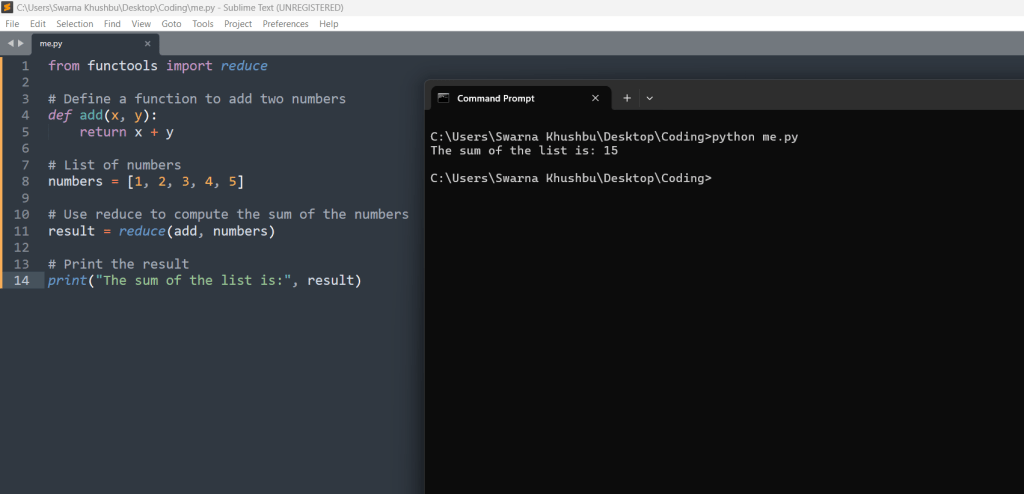
In this example, the reduce() function works as follows:
- First Step: Applies
add(1, 2)resulting in3. - Second Step: Applies
add(3, 3)resulting in6. - Third Step: Applies
add(6, 4)resulting in10. - Fourth Step: Applies
add(10, 5)resulting in15.
Finally, reduce() returns 15, which is printed as the sum of the list.
Let us take another example:
# python code to demonstrate working of reduce()

# importing functools for reduce()
import functools

# initializing list
lis = [1, 3, 5, 6, 2]

# using reduce to compute sum of list
print("The sum of the list elements is : ", end="")
print(functools.reduce(lambda a, b: a+b, lis))

# using reduce to compute maximum element from list
print("The maximum element of the list is : ", end="")
print(functools.reduce(lambda a, b: a if a > b else b, lis))
Output:

Using Operator Functions
The reduce() function can also be combined with operator functions to achieve similar functionality as with lambda functions, enhancing code readability.
# python code to demonstrate working of reduce()
# using operator functions

# importing functools for reduce()
import functools

# importing operator for operator functions
import operator

# initializing list
lis = [1, 3, 5, 6, 2]

# using reduce to compute sum of list
# using operator functions
print("The sum of the list elements is : ", end="")
print(functools.reduce(operator.add, lis))

# using reduce to compute product
# using operator functions
print("The product of list elements is : ", end="")
print(functools.reduce(operator.mul, lis))

# using reduce to concatenate string
print("The concatenated product is : ", end="")
print(functools.reduce(operator.add, ["Coding", "form", "Codemagnet"]))
Output:

reduce() vs accumulate()
Both reduce() and accumulate() functions can be used to compute the summation of elements in a sequence. However, there are distinct differences in their implementation and behavior.
- Module Definition:
reduce()is defined in thefunctoolsmodule.accumulate()is defined in theitertoolsmodule.
- Intermediate Results:
reduce()stores intermediate results internally and only returns the final summation value. It does not provide access to these intermediate values.accumulate()returns an iterator that contains all the intermediate results. The last value in this iterator is the final summation value of the sequence.
- Argument Order:
reduce(fun, seq)takes the function as the first argument and the sequence as the second argument.accumulate(seq, fun)takes the sequence as the first argument and the function as the second argument.
Example Comparison
Here’s a detailed example to illustrate the differences:
Using reduce():
from functools import reduce

# Function to add two numbers
def add(x, y):
    return x + y

# Sequence of numbers
numbers = [1, 2, 3, 4, 5]

# Using reduce to compute the sum
result = reduce(add, numbers)
print(result)  # Output: 15
In this example, reduce() applies the add function cumulatively to the items of numbers, from left to right, so as to reduce the sequence to a single value, which is 15.
Using accumulate():
from itertools import accumulate
import operator

# Sequence of numbers
numbers = [1, 2, 3, 4, 5]

# Using accumulate to compute the sum
result = list(accumulate(numbers, operator.add))
print(result)  # Output: [1, 3, 6, 10, 15]
In this example, accumulate() returns an iterator of accumulated sums: [1, 3, 6, 10, 15]. The final value in this list is the same as the result from reduce(), but accumulate() also provides all intermediate sums.
reduce() function with three parameters
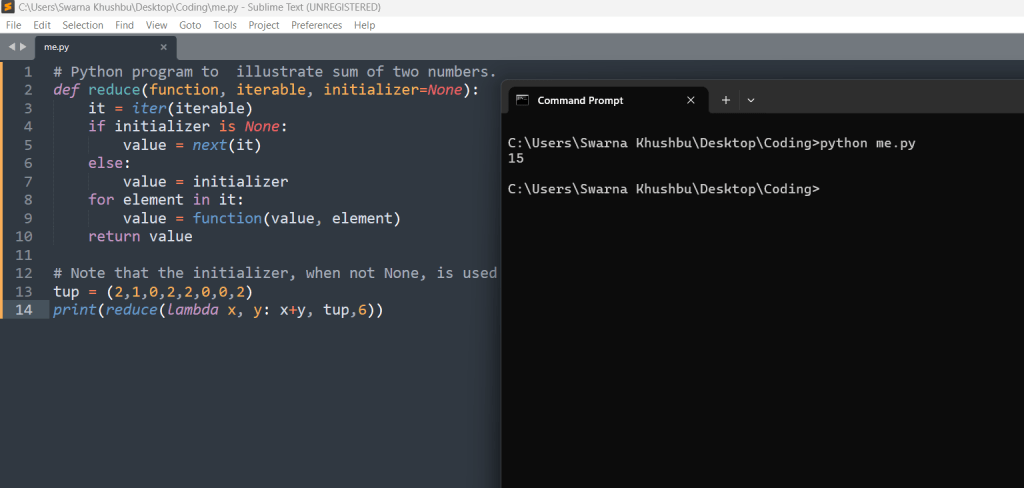
Reduce function i.e. reduce() function works with 3 parameters in python3 as well as for 2 parameters. To put it in a simple way reduce() places the 3rd parameter before the value of the second one, if it’s present. Thus, it means that if the 2nd argument is an empty sequence, then 3rd argument serves as the default one.
Here is an example :(This example has been take from the functools.reduce() documentation includes a Python version of the function:
# Python program to  illustrate sum of two numbers.
def reduce(function, iterable, initializer=None):
    it = iter(iterable)
    if initializer is None:
        value = next(it)
    else:
        value = initializer
    for element in it:
        value = function(value, element)
    return value

# Note that the initializer, when not None, is used as the first value instead of the first value from iterable , and after the whole iterable.
tup = (2,1,0,2,2,0,0,2)
print(reduce(lambda x, y: x+y, tup,6))
Use Cases:
- Common use cases for
reduce()include calculating the sum, product, or any other cumulative operation on a sequence of values. - It’s especially useful when you want to avoid writing explicit loops.
Remember that the reduce() function is less commonly used in modern Python code due to the availability of list comprehensions, generator expressions, and other more readable constructs. However, it’s still valuable to understand how it works and where it can be applied. 😊
Let’s wrap up the discussion on the reduce() function in Python and highlight its usefulness.
The reduce() function, available in the functools module, serves a specific purpose: cumulative computation. Here’s why it’s useful:
- Cumulative Operations:
- The primary use case for
reduce()is to perform cumulative operations on a sequence of values. - Whether you need to find the sum, product, or any other cumulative result,
reduce()simplifies the process by applying a binary function iteratively.
- The primary use case for
- Avoiding Explicit Loops:
- By using
reduce(), you can avoid writing explicit loops to accumulate values. - It streamlines your code and makes it more concise.
- By using
- Understanding Functional Programming:
- Learning about
reduce()introduces you to functional programming concepts. - Functional programming emphasizes immutability, higher-order functions, and declarative code, and
reduce()aligns with these principles.
- Learning about
- Historical Context:
- While
reduce()is less commonly used in modern Python due to alternatives like list comprehensions and generator expressions, understanding its historical context is valuable. - It’s part of Python’s rich heritage and showcases different approaches to solving problems.
- While
In summary, the reduce() function provides an elegant way to perform cumulative computations, and although it’s not as prevalent today, appreciating its role enhances your Python skills. 😊





Leave a Reply