

Dask is a powerful open-source library for parallel computing, offering a flexible and intuitive solution for handling large datasets and complex computations.
In this article, we’ll explore the capabilities of Dask, how to install it, and its key features.
What is Dask?
Dask is a Python library designed for parallel computing, providing dynamic task scheduling optimized for interactive workloads. It extends popular data structures like NumPy arrays and Pandas DataFrames to handle large datasets that may not fit into memory.
While tools like Pandas and NumPy are widely used for big data analysis, they often struggle when datasets exceed available memory. Dask addresses this limitation by enabling datasets to be processed on disk, allowing seamless scaling from a single machine to large clusters depending on the data size.
How to Install Dask
To install Dask, you can use the following command in your terminal:
python -m pip install "dask[complete]"
Let’s see an example comparing dask and pandas.
1. Pandas Performance: Read the dataset using pd.read_csv()Python3
import pandas as pd

%time
temp = pd.read_csv('dataset.csv',
                          encoding = 'ISO-8859-1')
Output:
CPU times: user 619 ms, sys: 73.6 ms, total: 692 ms
Wall time: 705 ms
2. Dask Performance: Read the dataset using dask.dataframe.read_csvPython3
import dask.dataframe as dd

%time df = dd.read_csv("dataset.csv",
                        encoding = 'ISO-8859-1')
#Output

CPU times: user 21.7 ms, sys: 938 µs, total: 22.7 ms
Wall time: 23.2 ms
Handling Large Datasets with Pandas: How Dask Enhances the Process
Before the introduction of Dask, dealing with large datasets in Pandas required several workarounds to manage memory efficiently. Here are some of the common techniques that were employed:
- Using the
chunksizeParameter inread_csv:
This technique involves reading large CSV files in smaller, more manageable chunks. By processing the data in smaller pieces, the memory load is reduced, making it possible to handle datasets that would otherwise be too large. - Selecting Only Necessary Columns:
By loading only the required columns from a CSV file, the amount of data read into memory is minimized. This approach helps in reducing memory usage when working with large datasets.
While these methods can be effective, they often fall short in situations where the dataset is too large to fit into memory, or when more complex operations are needed. This is where Dask becomes invaluable.
Basic DataFrame Operations with Dask
Dask extends Pandas’ DataFrame to larger-than-memory computations. Here’s how you can use Dask to work with large CSV files.
Example 1: Reading a Large CSV File
import dask.dataframe as dd

# Read a large CSV file into a Dask DataFrame
df = dd.read_csv('dataset.csv')

# Perform operations on the Dask DataFrame
df_filtered = df[df['column_name'] > 100]

# Compute the result to get a Pandas DataFrame
result = df_filtered.compute()

# Display the result
print(result.head())
Assume large_dataset.csv has the following columns: column_name, A, B, and contains numeric data.
column_name,A,B
50,1,4
150,2,5
250,3,6
350,4,7
75,5,8
Output:
   column_name  A  B
1          150  2  5
2          250  3  6
3          350  4  7
Only rows where column_name > 100 are included.The head() function displays the first few rows of the resulting DataFrame, which in this case would show rows with column_name values of 150, 250, and 350.
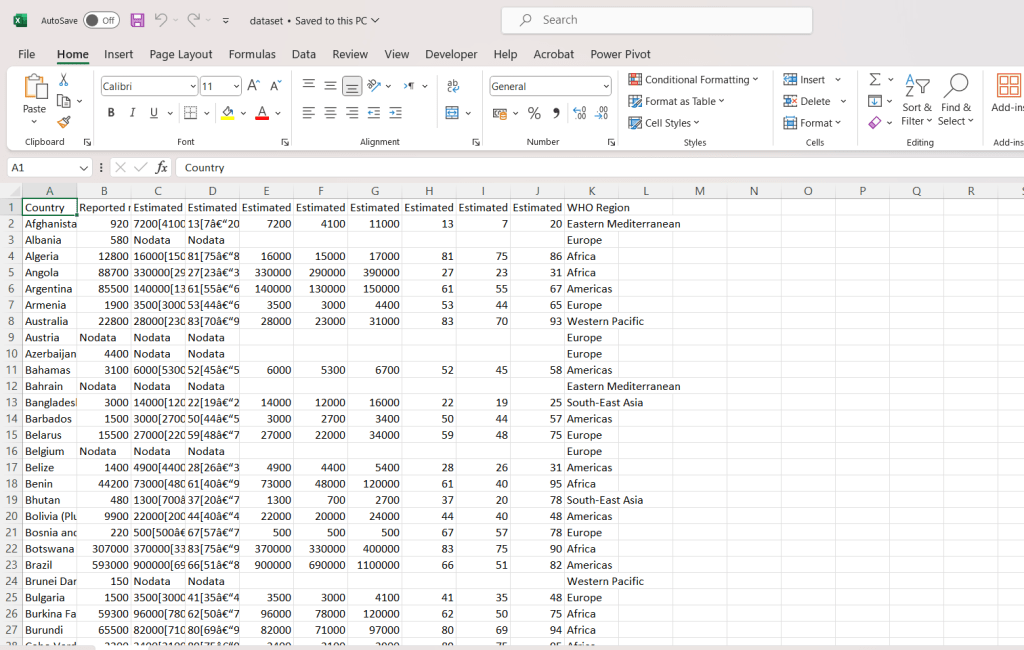
For large data you can download the free csv file of mine from here
Step-by-Step Breakdown:
- Reading the CSV File:
df = dd.read_csv('large_dataset.csv'): This creates a Dask DataFramedfthat represents the data inlarge_dataset.csvbut doesn’t load it into memory immediately.
- Filtering the Data:
df_filtered = df[df['column_name'] > 100]: This filters the DataFrame to only include rows wherecolumn_nameis greater than 100. At this point, the filtering operation is just planned; it hasn’t been executed yet.
- Computing the Result:
result = df_filtered.compute(): This triggers the actual computation, loading the filtered data into memory as a Pandas DataFrame.
- Displaying the First Few Rows:
print(result.head()): This prints the first few rows of the filtered DataFrame.
Working with Dask Arrays
Dask arrays parallelize operations on large, multi-dimensional arrays (like NumPy arrays).
import dask.array as da

# Create a large Dask array with random values
x = da.random.random((10000, 10000), chunks=(1000, 1000))

# Perform operations on the Dask array
y = x + x.T  # Add the array to its transpose

# Compute the result
result = y.mean().compute()

# Display the result
print(result)
Enter Dask: Overcoming Pandas’ Limitations
Dask is designed to seamlessly scale data processing tasks across both single machines and clusters. It breaks down large datasets into smaller, manageable chunks and processes them in parallel, either in-memory or on-disk. This allows Dask to handle datasets that would otherwise be impossible to manage with Pandas alone.
Types of Dask Schedulers
Dask offers several types of schedulers to execute tasks, each suited for different types of workloads:
- Single-Threaded Scheduler:
- Description: The single-threaded scheduler is the default option in Dask. It executes all tasks sequentially on a single thread.
- Use Case: While it doesn’t leverage parallel computing, it’s ideal for debugging and understanding the execution flow of tasks.
- Multi-Threaded Scheduler:
- Description: This scheduler utilizes multiple threads to execute tasks, making it suitable for workloads that involve a lot of I/O operations, such as reading from disk or network.
- Use Case: Best for tasks that are I/O-bound, where the time spent waiting on resources like disk or network is significant.
- Multi-Process Scheduler:
- Description: The multi-process scheduler runs tasks in parallel across multiple processes, each with its own Python interpreter.
- Use Case: Ideal for CPU-bound tasks, this scheduler enables true parallelism and is effective on multi-core machines.
- Distributed Scheduler:
- Description: This scheduler extends the capabilities of the multi-process scheduler to a cluster of machines. It allows tasks to be distributed across multiple interconnected machines.
- Use Case: Suitable for large-scale distributed computing environments, where tasks need to be managed and executed across a cluster.
- Adaptive Scheduler:
- Description: The adaptive scheduler dynamically adjusts the number of worker processes based on the workload.
- Use Case: Useful for workloads that fluctuate in intensity, ensuring that resources are allocated efficiently as demand changes.
Limitations of Dask
Despite its powerful capabilities, Dask does have some limitations:
- Task-Level Parallelism:
- Limitation: Dask cannot parallelize within a single task. While it can execute multiple tasks concurrently, each task itself runs sequentially.
- Security Considerations:
- Limitation: Dask enables the remote execution of arbitrary code, which means it should only be used within a trusted network. Exposing Dask workers to untrusted environments could pose significant security risks.
Conclusion
Dask stands as a versatile and powerful tool for parallel computing, offering solutions that extend beyond the limitations of Pandas and NumPy when handling large datasets. The choice of scheduler—whether single-threaded, multi-threaded, multi-process, distributed, or adaptive—depends on the nature of the computation, the available hardware, and the level of parallelism required. By selecting the appropriate scheduler, Dask allows for efficient and scalable data processing, making it an essential tool for modern data science and big data analytics.





Leave a Reply